Small Size Deployment
The small size deployment model is designed for compact industrial environments with a limited number of SCADA clients, controllers, and network infrastructure. This model supports up to 1 Controller, up to 1 PLC Guard, and up to 5 ControlGuards.
The model introduces the First Watch® platform in two progressive scenarios: Monitoring and Active Protection. The monitoring scenario serves as a prerequisite for the active protection scenario — ensuring that the environment is fully understood, assets are verified, and policies are validated before enforcement is enabled.
Scenario 1 — Monitoring
In the monitoring scenario, the First Watch® platform provides full visibility and alarm capability without any enforcement. The goal is to observe the environment, detect anomalies, and build an accurate operational baseline.
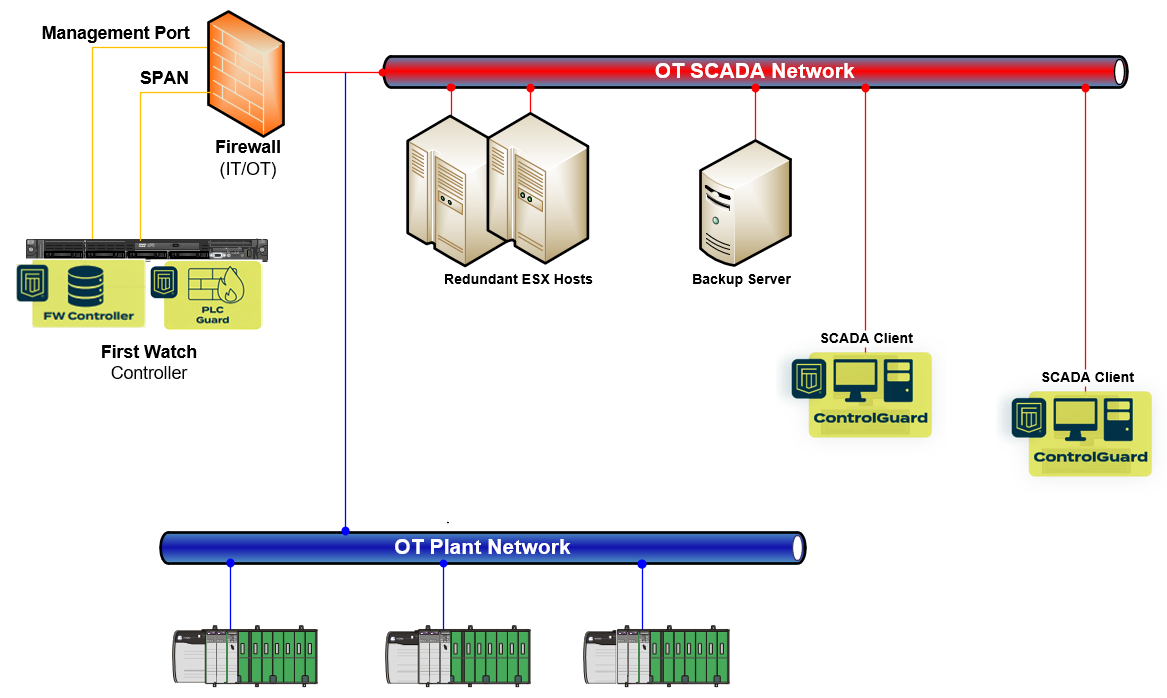
Architecture
- Controller and PLC Guard are installed on the same physical device, minimising infrastructure requirements
- PLC Guard operates in monitoring mode — its physical port is connected to the SPAN port of the firewall, passively mirroring network traffic without sitting in the communication path
- ControlGuards are installed in monitoring mode on SCADA clients
PLC Guard — Network Monitoring
Connected to the firewall SPAN port, PLC Guard passively analyses mirrored traffic to provide:
- Visibility into industrial protocol communications (CIP, Modbus, S7CommPlus)
- Detection of unauthorised communication attempts to controllers
- Identification of unexpected devices or communication patterns
- Baseline of normal network behaviour for future policy creation
In monitoring mode, PLC Guard observes and reports but does not block or filter any traffic.
ControlGuard — Endpoint Monitoring
ControlGuards deployed on SCADA clients operate in monitoring mode, generating alarms when critical events are detected:
- Unauthorised software appearing on SCADA clients
- PowerShell sessions with elevated privileges — a common indicator of administrative or potentially malicious activity
- Elevation of privileges for particular user accounts
- Unexpected process execution or configuration changes
ControlGuards do not prevent these actions in monitoring mode — they ensure that operational personnel are immediately aware when they occur.
Event Flow and Alerting
All events from PLC Guard and ControlGuards are sent to the Controller, where:
- Events are correlated and analysed in context
- Alarms are raised based on configured rules and severity
- Notifications are sent to the responsible person via email or mobile
- Events and alarms can be forwarded to an external SIEM for integration with broader security operations
This scenario provides complete situational awareness while introducing zero risk to operations.
Scenario 2 — Active Protection
Once the monitoring phase has established a verified baseline and validated policies, the deployment transitions to active protection. In this scenario, the First Watch® platform moves from observation to deterministic enforcement.
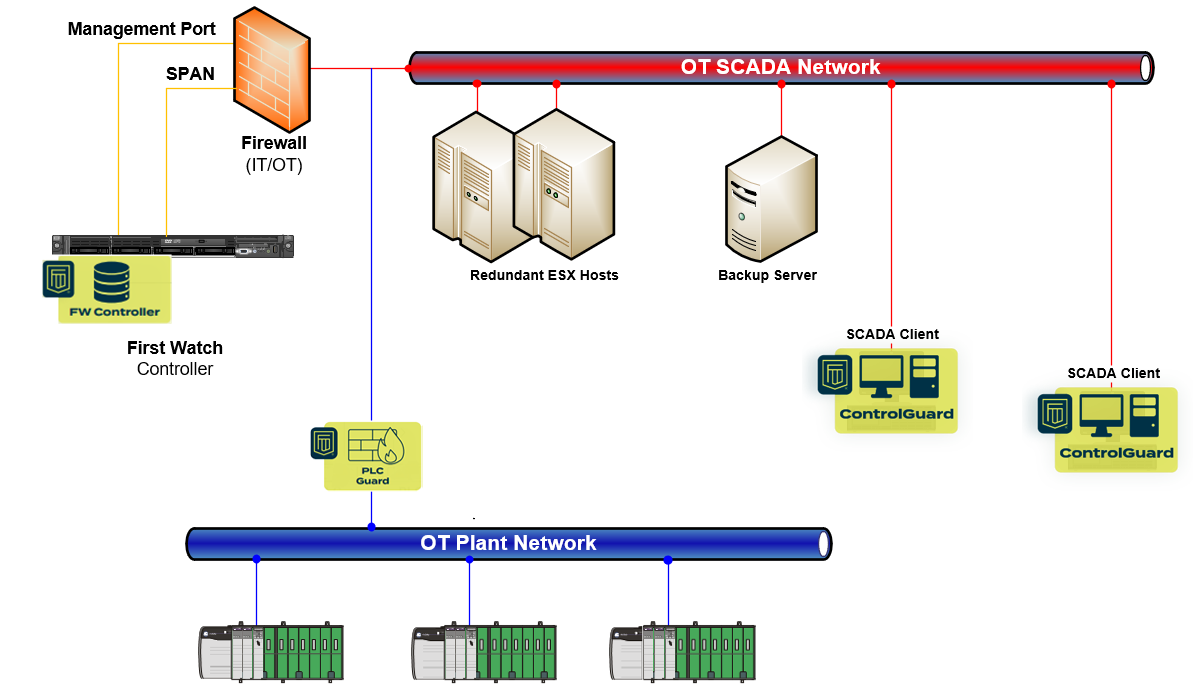
Architecture
- PLC Guard is redeployed as an inline filtering device — positioned directly in the communication path between the network and the controllers
- ControlGuards on SCADA clients are switched to enforcement mode
PLC Guard — Inline Protection
Operating inline, PLC Guard enforces communication policies at the protocol level:
- Read and write of process variables are allowed — enabling normal SCADA operations to continue uninterrupted
- PLC logic updates are blocked — preventing unauthorised programming changes to controllers
- Firmware updates are blocked — protecting controller integrity from unauthorised modifications
This selective enforcement ensures that day-to-day operations proceed normally while the most critical and potentially destructive actions — logic and firmware changes — require explicit authorisation through the platform's governance process.
ControlGuard — Endpoint Enforcement
With ControlGuards in enforcement mode on SCADA clients:
- Unauthorised applications are prevented from running — only approved, whitelisted software is permitted to execute
- Attempts to run unapproved software are blocked in real time and generate alarms
- All enforcement actions are logged with full attribution and timestamps
This transforms SCADA clients from monitored endpoints into actively protected, hardened workstations.
Event Flow and Response
As with the monitoring scenario, all events flow to the Controller for correlation, alarm generation, and notification. The key difference is that in the active protection scenario, threats are prevented — not just detected.
Progression Path
| Aspect | Scenario 1 — Monitoring | Scenario 2 — Active Protection |
|---|---|---|
| PLC Guard deployment | SPAN port (passive) | Inline (filtering) |
| PLC Guard behaviour | Observe and report | Block unauthorised logic and firmware changes |
| ControlGuard mode | Monitoring | Enforcement |
| ControlGuard behaviour | Alarm on critical events | Prevent unauthorised application execution |
| Event flow | Events → Controller → Alerts / SIEM | Events → Controller → Alerts / SIEM |
| Operational impact | None | Deterministic protection |
The monitoring scenario is the recommended starting point for every small size deployment. It allows organisations to build confidence in the platform's visibility, validate policies through audit mode, and transition to active protection only when the operational baseline is fully understood and approved.